Help Is Already on the Way

Towing, Tires, and Fuel

When a vehicle goes down, integrated roadside assistance gets towing, tires, and fuel moving fast.

  • Around-the-clock dispatch through the Agero network
  • Towing, tires, jump starts, lockouts, and fuel
  • Live location auto-attached to every dispatch
MyGeotab map pinpointing a vehicle’s exact location

When It Goes Wrong

Downtime Measured in Minutes, Not Afternoons

The platform already knows where the vehicle is. Help gets there faster.

Full-service coverage

Towing, tire changes, jump starts, lockouts, and fuel delivery.

Live ETA to the scene

Watch the assigned truck approach with a live ETA, in the cab and the office.

Around-the-clock dispatch

Through the Agero network, dispatched to the vehicle’s live location.

One number to call

Drivers get help without hunting for vendors.

What Changes

Breakdowns Handled Before Dispatch Starts Dialing

Drivers back on route

Less waiting at the shoulder, more finishing the day.

Predictable handling

Every breakdown follows the same fast process.

Less dispatcher scramble

No calling around for a tow at 5 PM on Friday.

The Network Behind The Promise

Agero's Network, Your Vehicle's Live Location

Roadside help is provided through Geotab's partnership with Agero, one of the largest roadside networks in the US and Canada, with 30,000+ service providers (Geotab Maintenance 101, 2025).

Every provider in the network is vetted to Agero's service standards, so drivers get consistent help whether they break down in a metro or two hours past it.

Covered Services, With the Fine Print

Every covered service carries its own limits, spelled out one by one below.

Coverage applies to qualifying light-duty vehicles: passenger vehicles and light trucks up to 10,000 lb GVWR, about 4,535 kg (Roadside Assistance Add-In User Guide, 2024).

Step By Step

How a Request Actually Runs

01
The request starts anywhere

A driver requests help from the Geotab Drive app, or a dispatcher creates the request in MyGeotab on the driver's behalf.

02
The location is already right

The vehicle's position auto-fills from the GO device; the dispatcher confirms or adjusts it, picks the service type, and answers a couple of type-specific questions.

03
Details fill themselves

Vehicle details fill from the VIN. Preferred tow destinations you have saved (your shop, your dealer) are one click.

04
Watch the truck arrive

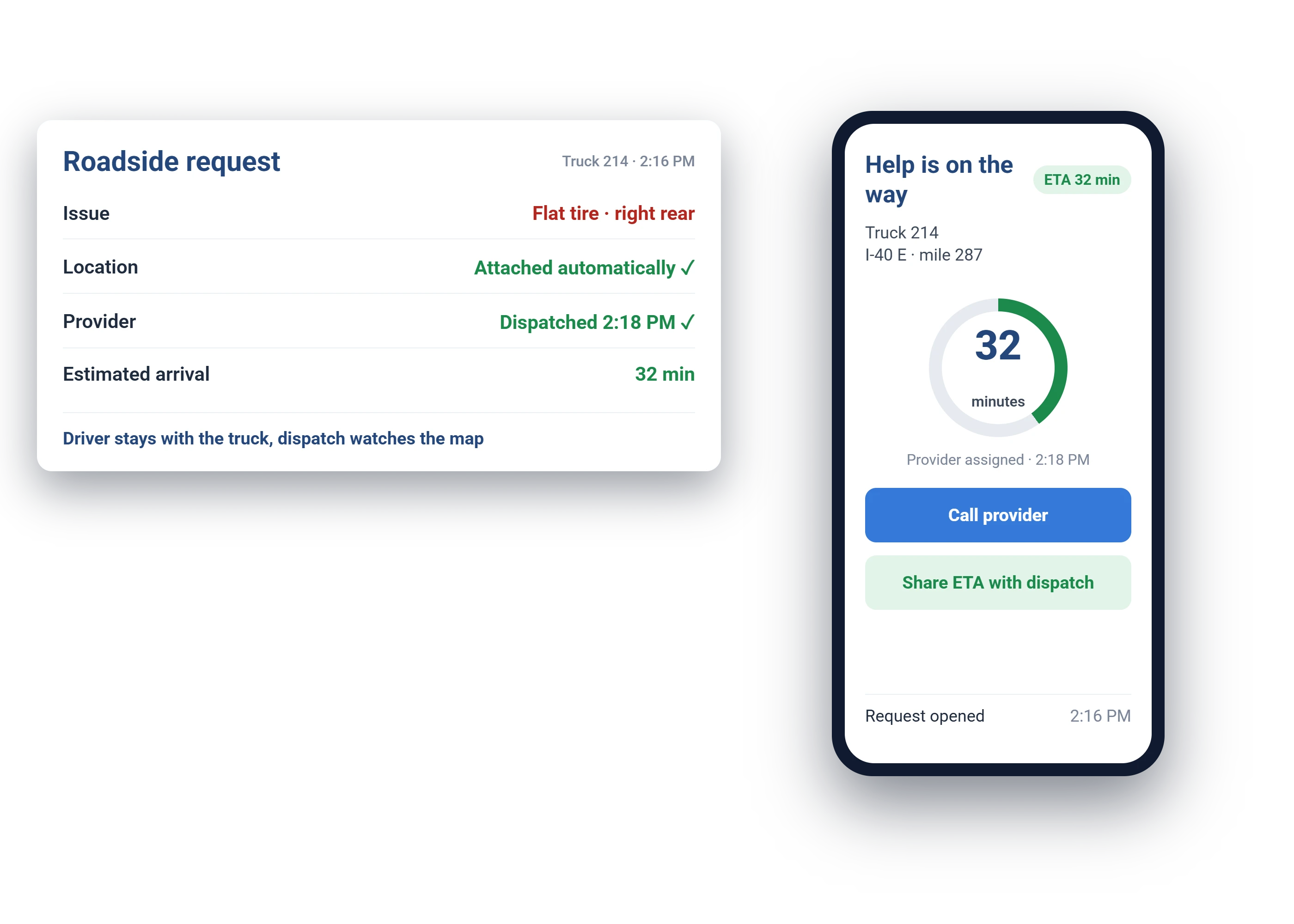
The nearest provider is assigned, and the map shows the truck coming with a live ETA. The driver can opt into SMS updates and watch the same progress from the cab.

05
Back on the road

The provider completes the service, and the event closes out in the add-in with the record kept against the vehicle.

Start a Free Pilot Today

Geotab roadside assistance request with live vehicle location

In MyGeotab

Dispatch With the Location Already Right

No one wastes a call asking where the service truck is, because dispatch and the driver watch the same status.

The details

Geotab Roadside Assistance, Service by Service

Every service has limits worth knowing before you need it. Here is what each one includes.

Questions

Roadside Assistance FAQ

How does integrated roadside assistance work?

Help is available to your drivers and connected to your platform, so support and location context live in one place.

Is it available around the clock?

Yes. Dispatch runs around the clock through the Agero network for covered vehicles.

Does location data speed up response?

Exact vehicle location shortens response time and removes the guesswork of finding a stranded vehicle.

Who actually shows up?

A vetted provider from the Agero network described above, dispatched to your vehicle's location rather than a cross street someone has to describe over the phone.

Can the driver request help without calling the office?

Yes, directly from the Geotab Drive app, with the location attached automatically. Or dispatch creates the request on their behalf; both see the same live status.

Is this included in our subscription?

Coverage and per-event costs depend on your rate plan and vehicle class, and any charges are shown for authorization before dispatch. Ask us to confirm your fleet's current terms.

Add a Safety Net Under Your Fleet

Ask us about roadside coverage when you set up your free demo.

Prefer to talk? Call (877) 771-2236.