Software Built Around How Your Fleet Actually Works

Custom Add-Ins and Integrations

Every fleet runs a little differently. When the standard screens do not cover it, our in-house developers build what does, inside the MyGeotab your team already logs into.

  • In-house developers, not an outsourced queue
  • Built on Geotab's documented SDK and API
  • Runs inside MyGeotab, under your existing logins
What We Build

If the Platform Does Not Do It Yet, We Build It

Six kinds of work, all of it landing in the platform you already run instead of a separate tool nobody opens.

Add-ins inside MyGeotab

A custom page that loads in the MyGeotab menu beside Map and Reports, using the same login, the same groups, and the same permissions your team already has.

Integrations with your other systems

ERP, payroll, dispatch, and warehouse systems connected through the MyGeotab API, so hours, jobs, and vehicle data move on their own instead of by spreadsheet.

Reports and dashboards to your spec

The number your leadership actually asks for, calculated the way your operation defines it, then scheduled to the people who need it.

Feeds into your own database

A continuous feed of trips, GPS, faults, and exceptions into your warehouse or BI tool, so analysts query fleet data beside everything else they model.

Sensors and hardware inputs

PTO, temperature, door, and lift signals wired in through the GO device's IOX ports, so the equipment side of the job reports alongside the driving.

Automations and alert logic

Rules and workflows tuned to your thresholds and your escalation path, firing on their own so nobody has to sit and watch a screen.

Where It Lives

It Opens in the Menu Your Team Already Uses

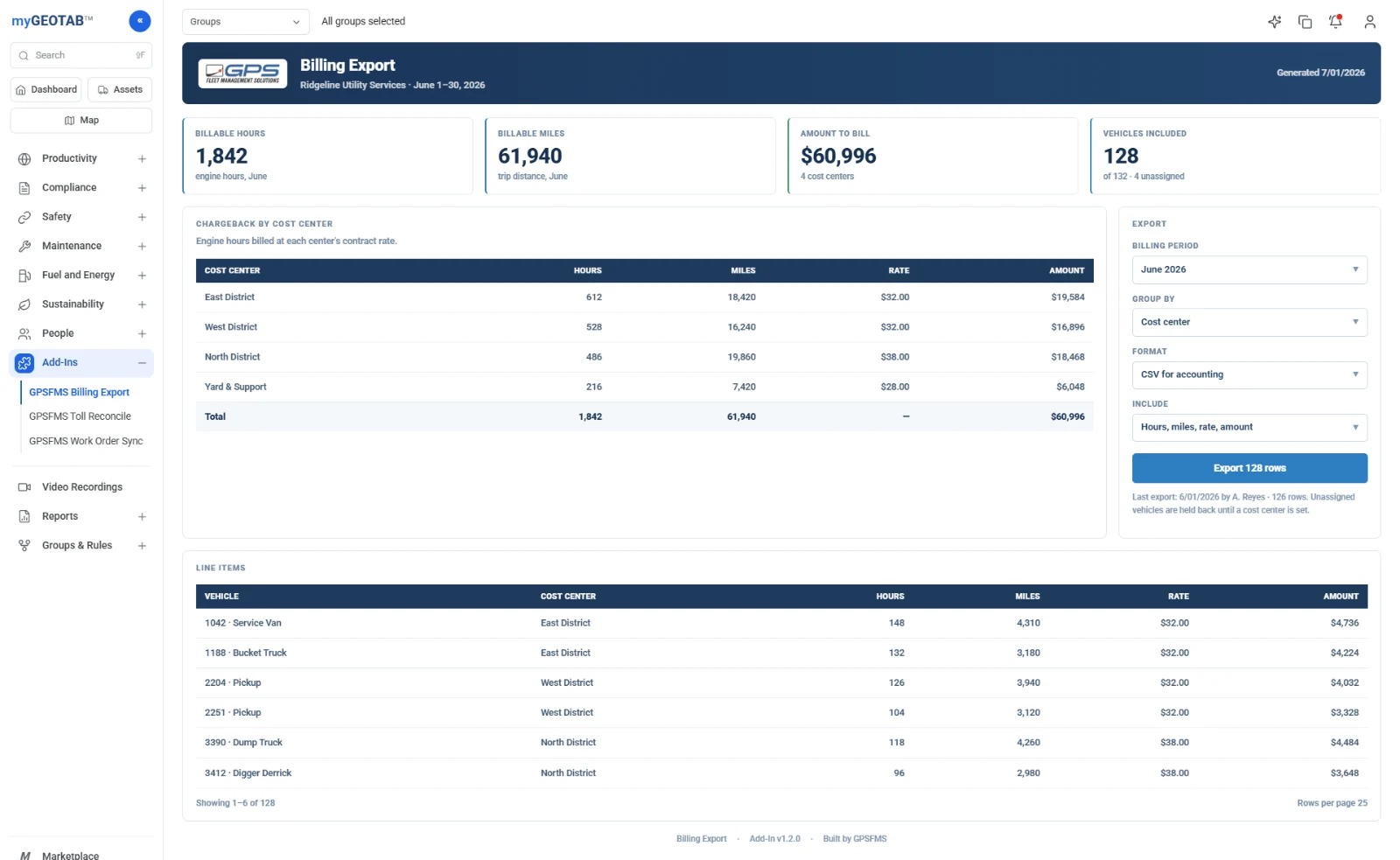
No new address to remember, no second password. A GPSFMS add-in sits in the MyGeotab side menu under Add-Ins and opens as a full page inside the platform, beside Productivity, Compliance, and Safety.

A custom GPSFMS add-in open inside MyGeotab: the Add-Ins section of the side menu is expanded with GPSFMS Billing Export selected, and the page shows billable hours and miles, a chargeback table by cost center, export options, and vehicle line items

A monthly chargeback export built for a utility fleet, turning engine hours into billable amounts per cost center. Company, rates, and figures shown are illustrative.

Built and Running Today

Add-Ins We Have Already Shipped

These were built for real customers with a specific problem, then kept in service. They are the shape of what we can build for yours.

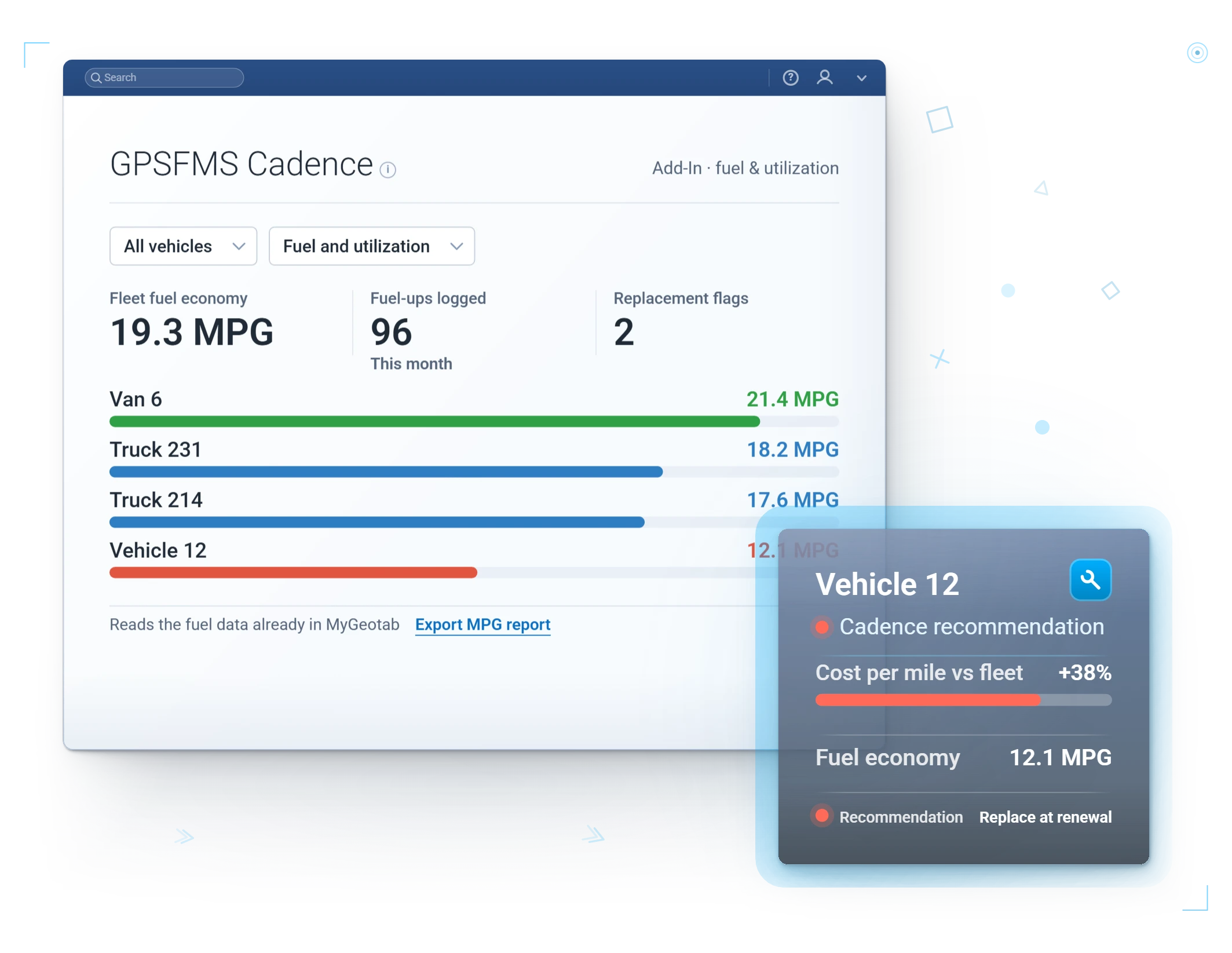
GPSFMS Cadence

A utilization add-in that reads the fuel data already flowing into MyGeotab to work out fuel-ups, miles per gallon by vehicle, and which units have earned a replacement recommendation.

GPSFMS Roll Out

Deployment control for large camera and device roll-outs: upcoming install schedules, phase by phase, and the health of every item in the roll-out so a stalled install gets caught instead of discovered later.

Dozens More, Client by Client

Geofencing add-ins, custom color coding, purpose-built map views, and one-off tools written for a single customer's workflow. If you have described it, odds are we have built something close.

Have a workflow like these? Scope it with our developers

How It Fits

Custom, Without Becoming a Science Project

Custom software earns a bad reputation when it lives off to the side. Everything we build sits inside the platform, under the platform's own rules.

One login, one menu

An add-in appears in MyGeotab like any other page. No second system for your team to learn, remember, or resist.

Documented, supported tooling

We build on Geotab's published SDK and API, the same interfaces the platform's own tools use, so nothing depends on a private workaround.

Your permissions still rule

Add-ins run under the signed-in user's clearances, and integrations get a dedicated service account with only the access the job requires.

Your data stays yours

Everything reads and writes in your own MyGeotab database. Nothing gets locked into a format only we can open.

Maintained as the platform moves

Geotab ships changes constantly. What we build for you stays on our list, not on yours.

The same team on the phone

The people who built it are the people you already call. No handoff to a vendor who has never seen your fleet.

Marketplace first, custom second. If a proven Geotab Marketplace solution already does the job, that is usually the faster path, and we will say so. Custom work is for the gap that is left over.

Questions

Custom Development FAQ

Do you really build this in house?

Yes. GPSFMS has its own developers. We scope the work with you, build it, put it in your database, and support it afterward.

What is a MyGeotab add-in?

A page that loads inside MyGeotab, in the same menu as Map and Reports. It uses your existing login and permissions, so there is no separate system to administer.

Can you connect Geotab to the software we already run?

Yes. The MyGeotab API moves data in both directions, which is how we connect ERP, payroll, dispatch, and warehouse systems to fleet data.

Where does the custom work run?

In your own MyGeotab database, under your users and clearances. An integration gets a dedicated service account scoped to only what it needs.

Do we need a developer on our side?

No. You describe the problem and how your operation defines the numbers. The building, testing, and upkeep are ours.

What if the Marketplace already has something for this?

Then we will point you at it. A proven Marketplace solution is usually faster and cheaper than a build, and we would rather solve it that way than write code for its own sake.

Tell Us What You Wish MyGeotab Did

Start with a free demo unit on one vehicle. Describe the gap while you have it in front of you, and we will tell you honestly whether it is a setting, a Marketplace solution, or something we build.

A Fleet Specialist will reach out right away. No obligation, no spam. Prefer to talk? (877) 771-2236